GL.iNet Flint 3 Wi-Fi 7 Router Review
My only experience with GL.iNet routers has been through ExpressVPN’s rebranded Aircove models, which use custom firmware rather than GL.iNet’s standard OpenWrt-based system. When I recently upgraded to a 2500Mbps CityFibre connection through Aquiss and experienced upload speed issues with my Unifi Cloud Gateway Max, the GL.iNet Flint 3 appeared on the recommended router list. While it didn’t solve my problem (faulty ONT), I came away extremely impressed with the router itself.
Key Specifications
The Flint 3 offers tri-band Wi-Fi 7 with theoretical combined speeds of 9300Mbps across three bands: 688Mbps at 2.4GHz, 2882Mbps at 5GHz, and 5765Mbps at 6GHz. It supports Multi-Link Operation (MLO) for cross-band connections and optimised latency.
Hardware includes five 2.5GbE Ethernet ports, a USB 3.0 port, 1GB DDR4 RAM, and 8GB eMMC storage. Four foldable external antennas with FEM amplification provide coverage. The router runs OpenWrt 23.05 with kernel 5.4.213, giving access to over 5000 plugins and advanced configuration options.
Software features include GoodCloud for remote management, AstroWarp for device monitoring, VLAN support, Multi-WAN, load balancing, and failover protocols. For security, you get AdGuard Home integration, parental controls, and comprehensive VPN support (OpenVPN, WireGuard, Tor, ZeroTier, Tailscale) with up to 680Mbps throughput.
OpenWrt and MediaTek Criticism
A common criticism is that this router doesn’t use vanilla OpenWrt and has switched from MediaTek to Qualcomm chipsets, resulting in technically slower 5GHz speeds. This reflects a broader Wi-Fi 7 trend where brands have moved from 4×4 MIMO to 2×2 MIMO plus a 6GHz radio. For home users, 4×4 MIMO offers limited benefits since client devices are typically 2×2 at best. The advantages (improved range, higher capacity, better mesh backhaul) are questionable for most home environments, and GL.iNet doesn’t support mesh anyway.
Some GL.iNet enthusiasts argue the Flint 2 is superior with better OpenWrt support. I haven’t tested the Flint 2, so I can only judge this router on its own merits.
Design and Build
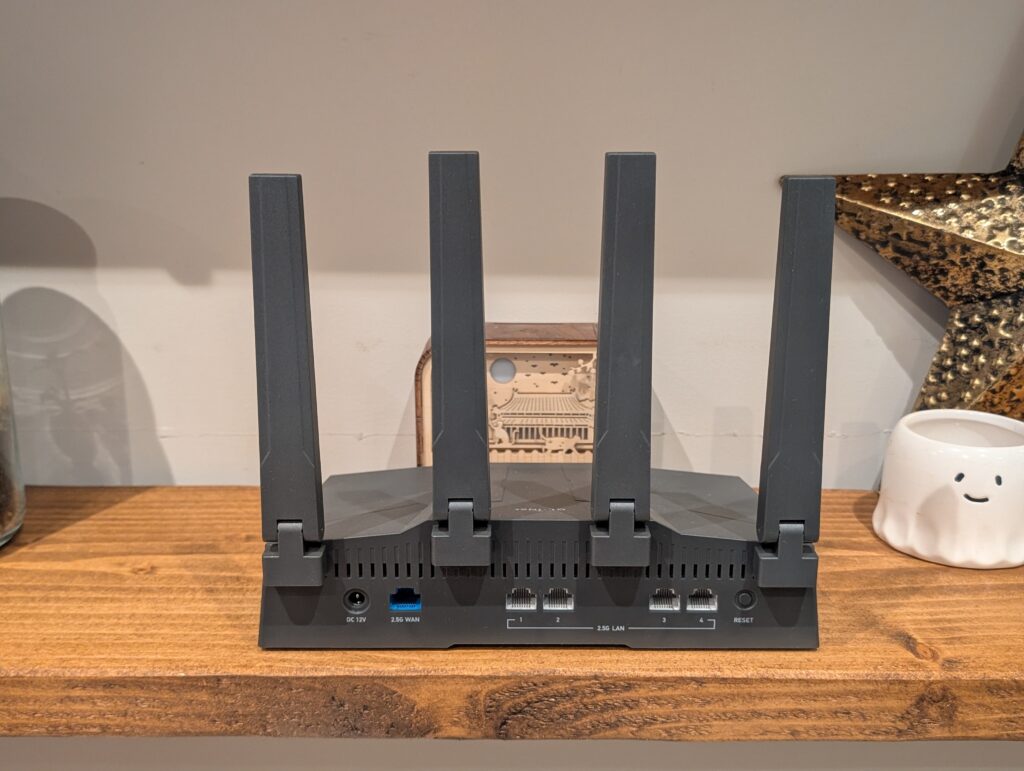
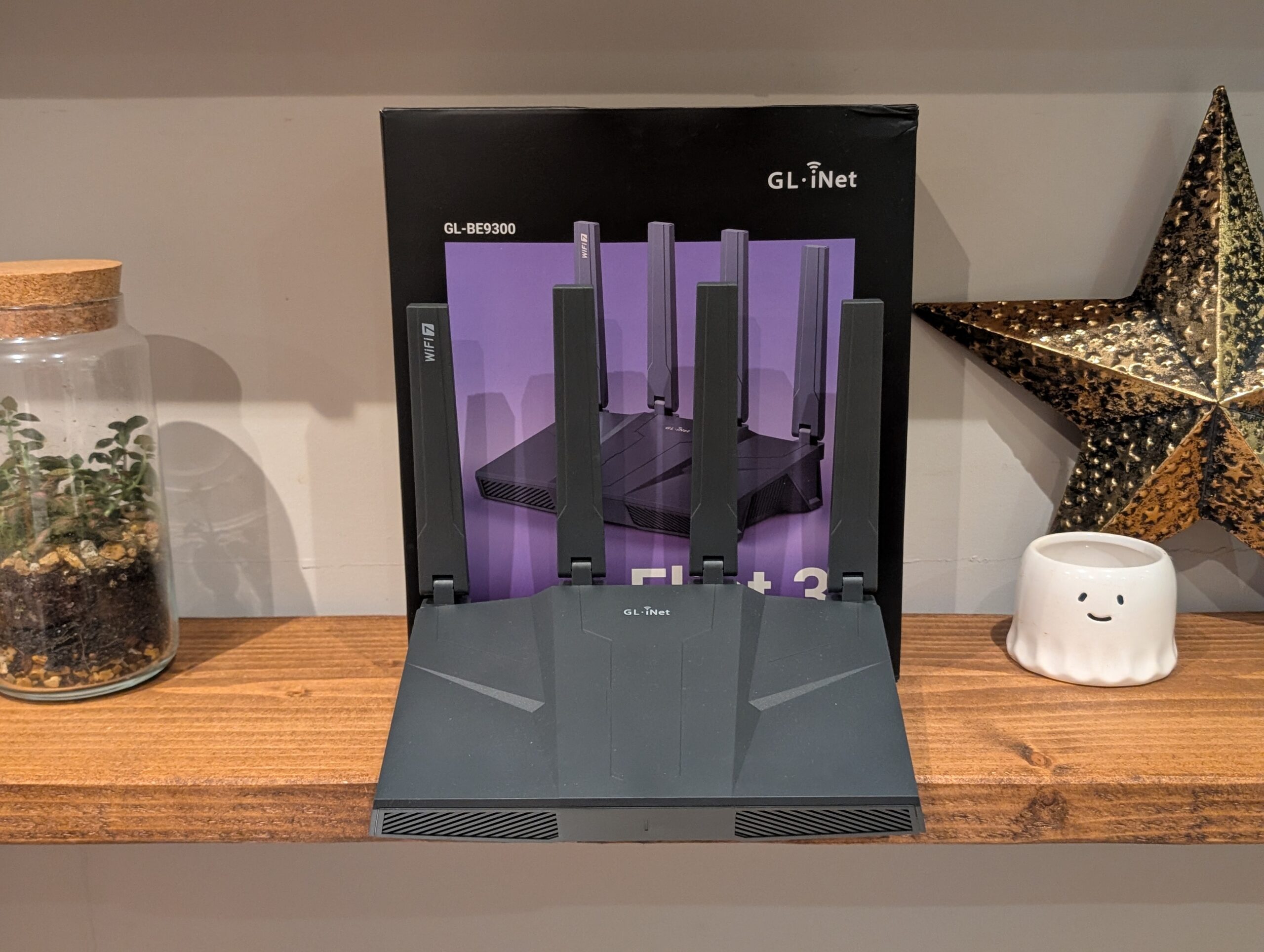
The box contains the router, a substantial power brick, and a flat Ethernet cable. The Flint 3 continues the Flint 2’s design language with heavy ventilation for heat management. The permanently attached antennas fold flat or angle to suit placement. While removable antennas would have been nice for third-party upgrades, the stock antennas are high-quality.
Having five 2.5GbE ports is rare at this price point. Most routers offer one 2.5GbE WAN port and four 1GbE LAN ports. This configuration is excellent for future-proofing and allows file transfers approaching 280MB/s with compatible devices like NAS units or modern PCs.
The front panel features a single dual-colour LED that glows blue during normal operation and can be disabled if needed. The 48W power adapter (12V/4A) is substantial but necessary for the 2.5GbE ports, Wi-Fi radios, and USB devices.
The aesthetic won’t suit everyone. Unlike sleek mesh systems, the Flint 3 looks like proper networking gear with its matte black finish, angular vents, and four tall antennas. It suits a home office or server cupboard better than a living room.
Setup and Interface
Setup is straightforward via smartphone app or web browser. I used the browser method for better control. Connect to the default Wi-Fi network, navigate to 192.168.8.1, and follow the wizard to set language, admin password, and Wi-Fi credentials. The router detected my PPPoE connection automatically and connected immediately after entering credentials.
The interface is notably responsive, likely due to the quad-core processor and generous RAM. GL.iNet uses a custom skin over OpenWrt that’s clean and easy to navigate. The dashboard shows network status, connected devices, and real-time traffic. However, you can access the LuCI interface for advanced OpenWrt control, allowing you to install software packages, configure firewall rules, and tweak parameters that consumer routers lock down.
The router runs OpenWrt 23.05 with Linux kernel 5.4.213. This older kernel is tied to Qualcomm’s QSDK drivers. While open-source purists might complain, it’s stable and GL.iNet backports security fixes.
AdGuard Home
I prefer AdGuard Home over PiHole for network-wide ad blocking and security. I host it on a Proxmox mini PC but switched to the Flint 3’s built-in version during testing. Having AdGuard Home integrated saves running it on separate hardware. Considering a Raspberry Pi 5 costs around £60, this is a sensible solution for most people.
The ad blocking, browsing security, safe search, and parental control features provide superior security compared to the security suites from brands like Netgear and TP-Link.
VPN Features
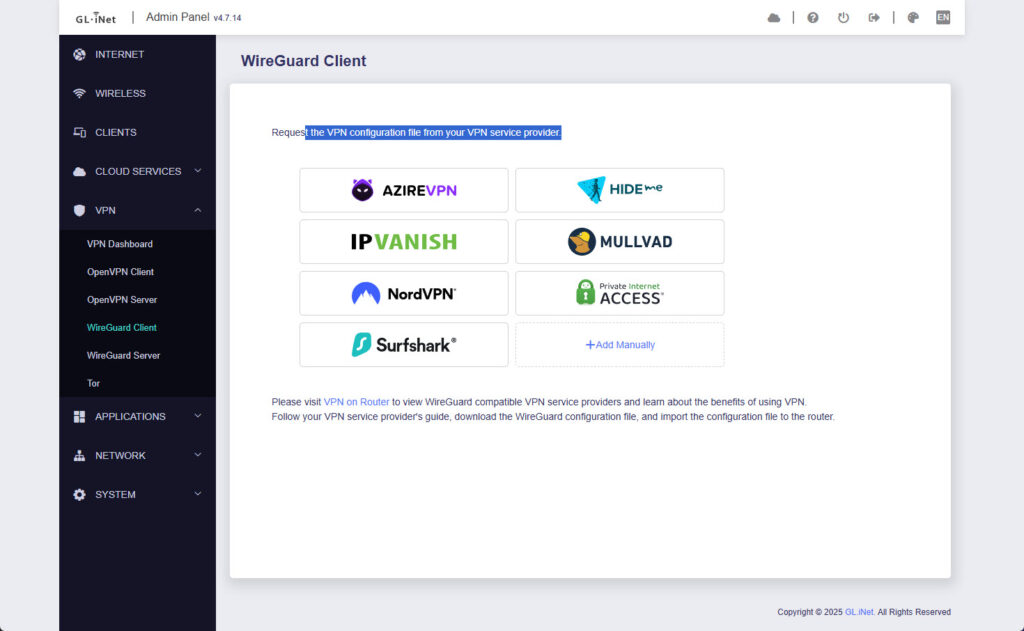
VPN capabilities are a major selling point. While most routers support WireGuard, OpenVPN, and L2TP, they typically require manual setup with configuration files and certificates. GL.iNet offers pre-defined options with simple authentication, making the process user-friendly through drag-and-drop configuration or direct API login.
I achieved speeds close to the 680Mbps specification with a local WireGuard server. This is exceptionally fast for a router, allowing permanent VPN use without significantly impacting fibre speeds.
Policy-based routing allows you to route specific devices or domains through the VPN while others use the normal connection. This is ideal for bypassing UK age verification checks or accessing geo-blocked content without affecting gaming PC latency.
Tailscale Integration
I travel frequently and work from an office, so remote home network access has become essential. My Unifi Cloud Gateway Max has Teleport, but performance can be inconsistent. Tailscale combines WireGuard with SSO, access control lists, and additional features.
The Flint 3 has integrated Tailscale and can function as a subnet router, providing full home network access (printers, NAS, cameras) without installing Tailscale on every device. I’ve found Tailscale to be the best option for remote access and appreciate its integration here.
Additionally, you can configure Tailscale to override DNS settings, so installing it on your phone and pointing it to the Flint 3’s AdGuard Home instance gives you ad blocking on mobile data connections.
Performance Testing
The quad-core Qualcomm processor handled my 2500Mbps PPPoE connection effortlessly while simultaneously running Wi-Fi and AdGuard Home. PPPoE authentication, used by many UK ISPs including Aquiss, Zen, and Vodafone, requires CPU cycles that can bottleneck older routers. The Flint 3 won’t be your limiting factor on high-speed FTTP plans.
Wi-Fi performance in my brick-built semi-detached home was impressive. Close range on 6GHz delivered speeds exceeding 1.8Gbps, faster than standard Gigabit wired connections. Medium range on 5GHz maintained 800-900Mbps with noticeably better penetration than my previous ISP router. Long range on 2.4GHz remained stable for 4K streaming even in the furthest corners. The 6GHz band dropped off more quickly than 5GHz, which is expected given the higher frequency.
Mesh Wi-Fi Limitations
The main issue compared to other brands is the lack of user-friendly mesh Wi-Fi. TP-Link has EasyMesh and Asus has AiMesh, both allowing network expansion with additional routers as satellites. GL.iNet supports extender mode and fast roaming with 802.11k/v/r, so you can replicate the functionality, but this requires networking knowledge beyond average home users. However, people buying this router for its advanced features should manage the setup. GL.iNet forums indicate mesh functionality is in development.
Power Consumption
Wi-Fi 7 radios and 2.5GbE PHYs are power-hungry. The router draws approximately 10-12W idle and stays below 20W under typical load. The datasheet lists maximum consumption under 25W without USB and under 37.2W with USB. While higher than basic ISP routers, it’s comparable to other high-performance Wi-Fi 7 models.
Thermal management is decent. The router gets warm underneath but large vents prevent overheating. I experienced no thermal throttling or instability during extended testing.
Pricing and Alternatives
The GL.iNet Flint 3 has an RRP of £175 but has dropped to £133 on Amazon. If you don’t need Wi-Fi 7 or all 2.5GbE ports, the Flint 2 typically costs £135 (as low as £105).
Similarly priced alternatives include the TP-Link Archer BE550 (£170, tri-band Wi-Fi 7, five 2.5GbE ports, EasyMesh), Asus RT-BE82U (£200, dual-band Wi-Fi 7, five 2.5GbE ports, AiMesh), Asus RT-BE92U (£220, tri-band Wi-Fi 7, 10GbE port, AiMesh), and Netgear Nighthawk RS200 (£160, dual-band Wi-Fi 7).
Conclusion
The GL.iNet Flint 3 is my favourite consumer router I’ve reviewed, and I’d use it as my main router if I weren’t committed to Unifi. Looking at hardware specifications, it’s priced attractively against competition. Most sub-£200 Wi-Fi 7 routers are dual-band, so you miss the ultra-fast 6GHz network benefits.
The main downside is the lack of true mesh support, limiting appeal to smaller homes or requiring Wi-Fi extenders. However, if mesh isn’t critical, the built-in features surpass any other consumer router I’ve used.
The extensive VPN features are excellent. Thanks to the Online Safety Act, VPN usage has increased, making this perfect for services like SurfShark or NordVPN. Domain-based policy routing is ideal for bypassing age checks on sites like Reddit.
The GoodCloud service makes this appealing for small IT companies and MSPs managing multiple routers. My company uses Draytek for smaller clients, and GL.iNet could be superior.
I’m a Tailscale convert, and having this integrated is perfect for remote home network access. It’s far superior to standard WireGuard VPN connections.
I’m also a massive AdGuard Home fan, and this feature benefits most home users. It’s easy to use, significantly improves browsing experience, and enhances security beyond what Netgear and TP-Link provide (and charge for).
I give this router a very strong recommendation. However, I haven’t used the Flint 2. If you want vanilla OpenWrt, better VPN throughput, and aren’t interested in Wi-Fi 7’s increased speeds, that’s likely the better choice.
GL.iNet Flint 3 Wi-Fi 7 Router
The GL-iNet Flint 3 is the best consumer router I’ve tested, offering exceptional value with five 2.5GbE ports, comprehensive VPN features, and integrated AdGuard Home and Tailscale. The lack of user-friendly mesh support is frustrating, but if you don’t need mesh or have the networking knowledge to configure extenders, the advanced features and competitive pricing make this an outstanding choice that far surpasses similarly priced alternatives from mainstream brands.
Pros
Five 2.5GbE ports
Comprehensive VPN support
Integrated AdGuard Home
Cons
No user-friendly mesh Wi-Fi
Uses older Linux kernel
5GHz is only 2×2 MIMO